Service procedures
Find the section relevant to the job and open the original pages to review instructions and precautions.

QMAN · AI for equipment service and maintenance
QMAN is QualiValue’s AI assistant for consulting equipment manuals. It helps technical service and maintenance teams find procedures, parts references and drawings. Technicians ask a question and can open the original pages from the answer when QMAN finds supporting information in the available manuals.
See a practical example QMAN website
QMAN can help maintenance departments, manufacturers’ after-sales networks and service centres. These examples show the kinds of searches you can start with.
Find the section relevant to the job and open the original pages to review instructions and precautions.
Start with a description of the component and check the original parts table for the reference and its applicability to the equipment.
Find a diagram or exploded view to identify an assembly and locate its components.
If different versions of a machine use different documentation, provide the model and serial number to narrow the search to relevant manuals.
During a service request, find the relevant passage in the manual and use it as a reference when speaking with the technician on site.
Find an earlier conversation and ask a follow-up question about the same component or job.
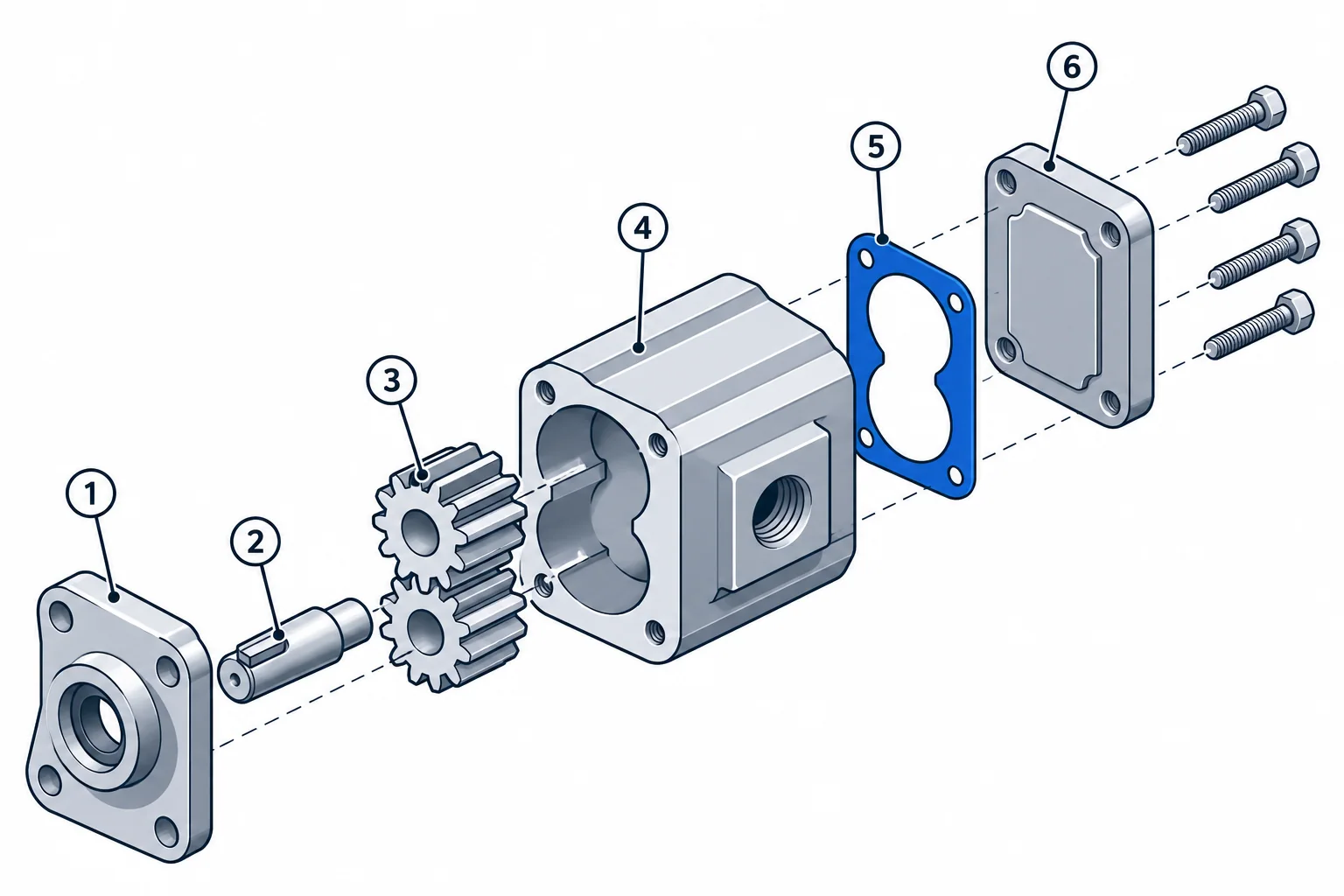
An exploded view like this illustration helps identify an assembly and navigate the parts table. When the drawing is available in the manuals you can consult, QMAN helps you find it along with its original page.
Looking up a replacement part
Illustrative example using a fictional pump.
They ask where to find the cover gasket. They provide the pump model and, if needed to distinguish versions, the serial number.
The assistant consults the manuals available to the technician. If it finds relevant evidence, it points to the assembly drawing and the corresponding parts table.
They match the drawing callout to the table row, check the document revision and verify applicability before using the reference in a parts request.
An administrator uploads manuals, checks which equipment models they cover and activates revisions ready for use.
The administrator chooses which manuals each user or group can access.
Technicians describe what they need. QMAN can ask for more equipment details and provides references to open when it finds an answer in the documents.
QMAN consults prepared and activated revisions available to your account. When it finds supporting information in the documents, it points you to the original pages.
Start by describing the component, issue or task. QMAN can ask for the make, model or serial number to narrow the search.
The search takes documented manual applicability into account. If a reference cannot be verified for the serial number you provide, the technician needs to check the documentation or consult the technical lead.
Administrators manage revisions and choose which manuals users and groups can access. Technicians can consult the manuals available to their account.
QMAN can ask for clarification or say it could not verify an answer. The administrator can check whether the right manual is available.
Open the original pages, check that the manual applies to the equipment and follow the manufacturer’s instructions and precautions.
Tell us what equipment you service and what information you look up most often. In the demo, we’ll show how to go from a question to the relevant manual page.
QMAN website